






DRS-1 | Differential Reference® Streamer & Media Hub


If you are ordering from Emotiva Europe, the product cost includes all taxes and free shipping. It is higher than our USA product price which does not include any taxes. USA customers pay taxes as a separate line item fee added at checkout.
Product Overview
Product Features

Emotiva + Volumio
Emotiva engineering with Volumio control lets you start faster and hear more detail from every source you play.

Clean, simple path
A short, clean path with an ESS Sabre ES9038Q2M DAC and OPA1656 op-amps delivers crisp transients, low noise, and natural sound.

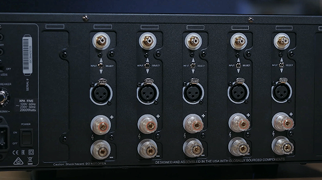
Quiet, balanced output
Use balanced XLR cables for lower noise and keep detail intact.

Digital + display outs
Optical and coaxial feed your DAC (digital-to-analog converter) or AVR; HDMI shows the interface and album art on your TV.
Specs & Downloads
Digital to Analog Conversion: ESS ES9038Q2M SABRE32 Reference DAC.
(32 bit Stereo DAC with Hyperstream® II DAC architecture and Time Domain Jitter Eliminator).
Analog Signal Path Active Electronics: MC33078 and OPA1656
(high-speed, low-distortion, audio operational amplifiers).
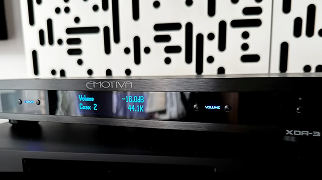
The DRS-1 is a high performance two channel audio streamer based on the popular Volumio Premium operating system. The DRS-1 can play content from a variety of streaming services, from locally connected USB storage devices, and from network-attached storage devices.
The DRS-1 includes both a variety of digital audio outputs, and both balanced and unbalanced analog audio outputs, powered by an internal high-performance DAC that uses the ESS ES9038Q2M SABRE32 Reference DAC chip. An HDMI video output is included, which displays the console screen of the unit, and can be used to display track information, album cover art, and other content information.
Balanced analog outputs (XLR); variable level controlled by Volumio software: 1 pair.
Unbalanced analog outputs (RCA); variable level controlled by Volumio software: 1 pair.
Digital audio outputs, optical S/PDIF (Toslink); fixed level: 1.
Digital audio outputs, electrical S/PDIF (Coax); fixed level: 1.
Network connection, wired Ethernet: 1.
Network connection, WiFi: 1.
USB ports: 2 (can be used to connect USB audio storage devices or mouse / keyboard).
HDMI output, video: 1 (displays configuration, track info, or Manifest UI on TV or monitor).
Trigger Input / Output: 1 each.
Balanced (XLR; at 0 dB in): 4.2 VRMS .
Unbalanced (RCA; at 0 dB in): 2.1 VRMS.
Frequency Response: 20 Hz to 20 kHz +/-0.2 dB (44.1k and above sample rates).
Broadband Frequency Response: 5 Hz to 80 kHz +0/-2 dB
Signal to Noise (S/N Ratio): > 116 dB.
THD+N (ref 0 dB): < 0.01%.
THD+N (ref -6 dB): < 0.002%.
Weight (unboxed): 5 pounds.
10-1/2 “W x 10-1/4”D x 2-1/4”H (unboxed; including feet)
Complete Your Audio Solution

- Precio habitual
- $499.00
- Precio de venta
- $499.00
- Precio unitario
- por

- Precio habitual
- $399.00
- Precio de venta
- $399.00
- Precio unitario
- por

- Precio habitual
- $399.00
- Precio de venta
- $399.00
- Precio unitario
- por

- Precio habitual
- $19.99
- Precio de venta
- $19.99
- Precio unitario
- por